


MusicGo - MP3 Music Player
4.8413.00 Reviews
App Specs
- Version
- 1.3.9
- Updated On
- License
- Free
- Downloads
- 5,000,000+
- Developer
- IPLUG
- Categories
- Music & Audio
- Platform
- Android, iOS
Screenshots
 Analysis by AppCompare
I judge a music player less by how exciting it feels on the first day than by whether it still earns a spot on my phone weeks later. MusicGo - MP3 Music Player is aimed at people who want a straightforward way to listen to music they can keep available offline, rather than another place to discover or stream songs. That focus gives it a useful role, though the right fit depends on how you already organize and get your music.
The first week: a quick route to listening
Music players often win or lose me in the small moments: can I find an album without hunting through menus, and can I start a playlist without turning a short walk into a setup task? MusicGo’s library can be sorted by artists, albums, or genres, which gives me familiar routes into a collection. If you already keep music files on your phone, that organization can make the app feel useful quickly rather than asking you to rebuild your listening habits around a new service.
Its appeal is clearest when the phone is acting as a player, not a music shop. For a commute, a workout, or background music while doing chores, a local library can be more dependable than streaming when reception is patchy. The practical first step is to sort out a few playlists for situations you repeat, then see whether browsing by album or artist suits the way you actually choose music. A tidy collection helps; a disorganized folder of files can make any player feel less convenient.
What makes the listening routine work
MusicGo is a free music and audio app from IPLUG. It has a 4.8 average from around 32,000 ratings, and it has been installed over 5 million times. Those figures suggest that a lot of listeners have tried it, but I would still judge it by whether its particular offline-first approach matches your own library. It is rated for Everyone, and version 1.3.0 is listed for devices running Android 7.0 or later.
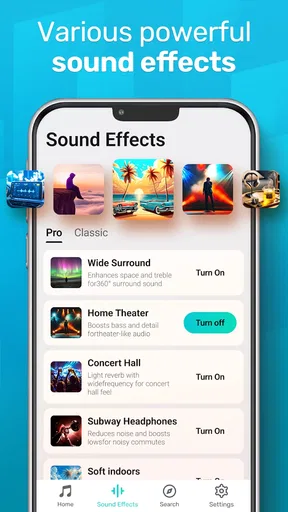
The sound controls can also make a daily difference. The equalizer offers presets as well as customization, so I can use a ready-made starting point or adjust the sound to suit my headphones and taste. A sensible tip is to make changes while listening to a familiar track, rather than chasing a dramatic effect with music you barely know. That makes it easier to tell whether a setting improves the sound or simply makes it louder or heavier.
Offline listening and the value of preparation
Offline playback is most valuable when I prepare before I need it. A playlist for a flight, a basement gym, or a route with unreliable reception is only useful if the tracks are already available on the device. I would check that the music I want is present and playable before leaving home, especially if I am relying on it for a long trip. That small habit prevents the common frustration of discovering a missing album after the connection has gone.
There is a useful trade-off here: keeping a personal collection available gives you more control over what plays and when, but it also means taking responsibility for the files and playlists you want on the phone. This is different from a streaming subscription, where a large catalog is easy to browse but access can depend on the service, connection, and account. If you mainly want new releases or recommendations chosen for you, a streaming app is likely the better companion. If you want your own selected tracks ready without relying on a signal, MusicGo’s offline angle is more relevant.
Worth Reading Before You Choose

EA SPORTS FC Mobile 26 Is a Bigger Football Game, but It Takes Time

Flipboard Shows What News Apps Must Do Beyond the Feed

Switching to Android Auto Means Rethinking Your Driving Routine

Google Calendar Makes a Crowded Week Easier to Manage

Ludo King Makes the Most of the Minutes Between Plans

Baby Panda World Brings Quick Play to Modern Phones, but Its Game Library Feels Busy
Sound flexibility without overcomplicating things
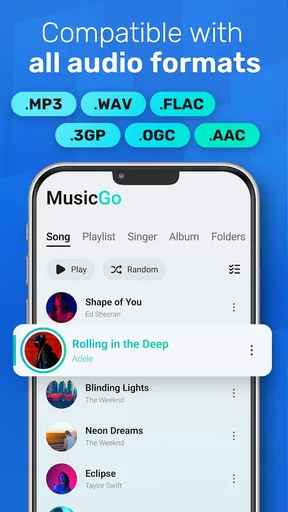
The player supports audio formats beyond MP3, including FLAC, WAV, and AAC. That can be handy if your collection has been built from different sources and you do not want to convert every file just to listen. It is also a reason to keep expectations grounded: a lossless file does not automatically sound better through every phone speaker or pair of headphones. I would treat format support as convenience first, then decide whether the extra storage used by larger files is worth it for the way I listen.
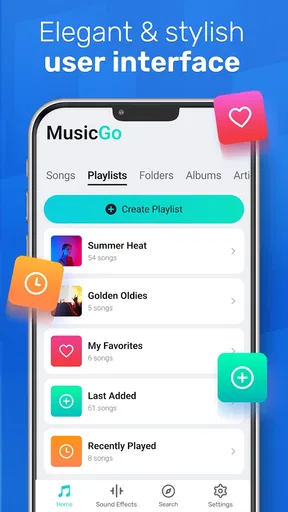
For a mixed library, a low-effort workflow is to group albums and loose tracks into a few playlists before relying on them day to day. Playlists can stand in for different contexts without requiring you to reorganize the underlying collection each time: one for exercise, one for focused work, and one for travel, for example. This is more useful than making a long list of playlists you rarely revisit. The benefit comes from having a short set of dependable choices, not from cataloging every possible mood.
Month-to-month value: does it keep earning space?
A player’s lasting value often comes from being predictable. If I can return to the same collection, find an album by artist, or start a familiar playlist without friction, it can become part of the daily routine. MusicGo’s emphasis on local listening gives it a stable purpose even when I am not looking for something new. That is a different kind of recurring value from streaming discovery: it serves the music I already chose rather than trying to keep refreshing the selection.
A realistic day might start with a playlist during a walk, continue with an album on the way to work, then switch to a different set of tracks for exercise later. If those choices are prepared in advance, offline playback can remove the need to check reception or use mobile data for the session. The useful question is not whether the app can cover every listening situation; it is whether the music you return to most is already part of the collection you can play through it.
That distinction matters if you share listening habits with other people. A personal player is a good fit for a collection you manage yourself, but it is less convenient when the main pleasure is browsing an enormous catalog together, trading recommendations, or following shared playlists across services. I would keep a streaming app for those social and discovery moments and use a local player for music I want available on my own terms. The two approaches can complement each other rather than compete.
Maintenance: a little organization pays off
Offline listening is not entirely hands-off. You need to keep the tracks you want on the device, make sure the collection remains organized enough to browse, and revisit playlists when your routine changes. That is modest upkeep for someone who already manages music files, but it may feel like unnecessary work to a listener accustomed to tapping a streaming library and letting the service handle availability.
I would start with a small, intentional collection rather than moving every file onto the phone at once. Keep the albums and playlists you actually use, then add more when a real need appears. This makes browsing less cluttered and helps you think about storage as a trade-off, especially if you prefer larger audio files. It also makes it easier to notice when a playlist has become stale instead of letting a huge library bury the music you reach for most.
One practical habit is to review travel and workout playlists before the relevant day, not while already offline or in a hurry. Another is to test an unfamiliar file format with a track you know before building a whole listening routine around it. These checks do not take much effort, but they prevent small surprises from becoming reasons to abandon the player. The app is most convincing when preparation stays simple and occasional.
Where friction and fatigue can appear
The same focus that makes an offline player dependable can also limit its appeal. If your collection is scattered, or if you expect the app to supply music you have not already chosen, the initial setup may feel like work. Sorting by artist, album, or genre helps once the library is in shape; it cannot make an uncurated collection feel personal by itself. For listeners who enjoy handing over the next-song decision to recommendations, a discovery-led streaming service will likely feel livelier.
There is also a difference between having music available offline and having a complete answer to every audio need. Someone who mainly listens to podcasts, radio, or continuously updated playlists may prefer an app built around those sources. MusicGo makes more sense when the central task is playing a collection of audio files. I would not choose it as my only music app if discovering unfamiliar artists is the main reason I listen.
Equalizer customization can be a pleasant extra, but it is easy to spend more time adjusting sound than listening. I find presets useful as quick starting points, while fine-tuning makes sense only if I can hear a consistent improvement with my own headphones. If a change makes one album sound better but another harsh or muddy, a neutral setting may be the less tiring everyday choice. The best setting is the one I stop thinking about once the music starts.
MusicGo’s store summary centers on offline music, and that is the strongest reason to consider it. In practice, I would treat it as a focused personal player, not as a replacement for every service that carries audio. A focused tool can stay useful for years, but only if its narrow job is one you repeatedly need. If your phone is already full of music apps and you never listen to files you manage yourself, adding another player may not improve your routine.
A lasting role for the right listener
MusicGo is a sensible choice for someone who already has a collection, wants familiar browsing by artist or album, and values having selected tracks ready when connectivity is inconvenient. It is also appealing if you like adjusting playback sound and have files in several common formats. I would recommend trying it with one everyday playlist first; if that becomes an easy part of your routine, expanding the library is a more useful test than judging it by a single listening session.
I would skip it if I rely almost entirely on streaming catalogs, want music discovery to happen automatically, or do not want to manage files and playlists. Those are not flaws so much as signs that a different kind of music app fits better. A streaming service is stronger for broad catalog browsing and recommendations; a local player is stronger when the music itself is already chosen and offline access matters.
Features That Hit the Right Note
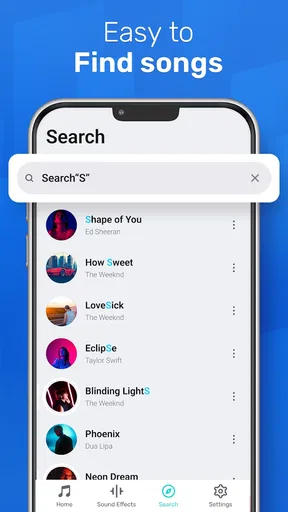
MusicGo brings a plethora of features to the table that make it a standout choice for music lovers. First off, the interface is as smooth as your favorite jazz track. It’s got that minimalistic vibe, making it super easy to navigate through your library without any fuss. You can sort your music by artists, albums, or even genres. It’s like having your personal DJ right in your pocket.
One thing I love about this app is the equalizer. With a range of presets and the ability to customize, you can tweak your sound to perfection. Whether you’re into bass-heavy beats or a more balanced sound, MusicGo has got you covered. It’s like seasoning your music just the way you like it.
Offline Listening and More
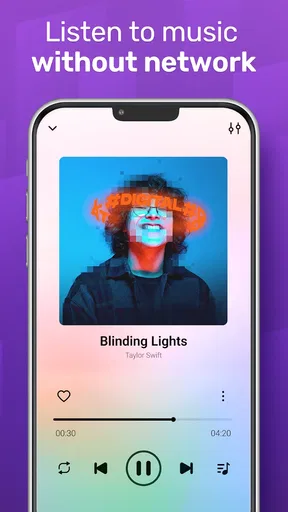
Another cool feature is the offline mode. You can download your favorite tracks and listen to them without any internet connection. This is perfect for those long flights or when you’re out in the boonies with no signal. You can create playlists for every mood, whether it’s a chill Sunday morning or a hardcore workout session.
The app also supports a variety of audio formats, so you’re not just stuck with MP3s. FLAC, WAV, AAC... you name it, MusicGo plays it. This flexibility is a game-changer, especially if you’re an audiophile looking for the best sound quality.
Why You Might Want to Hit Play
Honestly, what really sets this app apart is its user-friendly design and versatility. The developers have done an impressive job of keeping it simple yet effective. It doesn’t bombard you with ads or unnecessary features. It’s just pure music enjoyment, and isn’t that what we’re all here for?
On top of all this, the app doesn’t hog your phone’s resources. It runs smoothly without draining your battery faster than a live concert burns through tickets. Plus, it’s lightweight, so it won’t take up much space on your device.
Wrapping Up the Beat
In conclusion, MusicGo - MP3 Music Player hits all the right notes when it comes to being a reliable music app. With its sleek design, customizable sound, and offline capabilities, it’s a must-have for anyone who considers music an essential part of their daily life.
So, next time you’re looking to upgrade your listening experience, give MusicGo a spin. You might just find it’s music to your ears!
Pros
- User-friendly interface
- easy navigation.
- Supports a wide range of audio formats.
- Offline playback without data usage.
- Customizable equalizer settings.
- Quick and responsive performance.
Cons
- Contains ads that can interrupt playback.
- Limited features in the free version.
- No support for cloud storage services.
- Lacks built-in lyrics display.
- Frequent updates may cause minor bugs.
FAQs for MusicGo - MP3 Music Player
What features does MusicGo offer for music playback?
MusicGo - MP3 Music Player provides a range of features aimed at enhancing your music listening experience. These include a customizable equalizer, support for various audio formats, offline playback, and playlist management. Additionally, it offers a sleek interface and options to organize your music library efficiently. It's perfect for music enthusiasts looking for a comprehensive music player.
Is MusicGo compatible with both Android and iOS devices?
Yes, MusicGo is designed to be compatible with both Android and iOS devices. This ensures a wide range of users can enjoy its features. The app is optimized to run smoothly on different operating systems, providing a seamless experience whether you're using a smartphone or a tablet.
Does MusicGo support offline music playback?
Absolutely, MusicGo allows users to download their favorite tracks for offline playback. This feature is particularly useful for those who want to enjoy music without relying on an internet connection. Whether you're traveling or in an area with limited connectivity, MusicGo ensures your music is always accessible.
Are there any in-app purchases or ads within MusicGo?
MusicGo offers both a free version with ads and a premium version without advertisements. The premium version requires a subscription or a one-time purchase, which also unlocks additional features and enhancements. Users can choose based on their preferences and budget, ensuring flexibility and a tailored experience.
How user-friendly is the interface of MusicGo?
MusicGo boasts a user-friendly interface designed to provide a seamless and intuitive experience. Its layout is clean and easy to navigate, allowing users to quickly access their music library, playlists, and settings. Whether you're tech-savvy or new to music apps, MusicGo ensures you can enjoy your music with minimal hassle.


